Systems · AI video production
AI commercial production pipeline
A Python command-line pipeline that turns a storyboard into a short commercial. References are locked by checksum, Blender previs drives the motion, each video model has its own adapter, every paid request is previewed first, and FFmpeg assembles the cut.
At a glance
Role
Specified and built it with Claude Code and Codex. Directed the LIDO and PIP films and approved each paid take.
Tools
- Python
- Blender
- FFmpeg
- fal API
- Wan 3.0 Prime
Outcomes
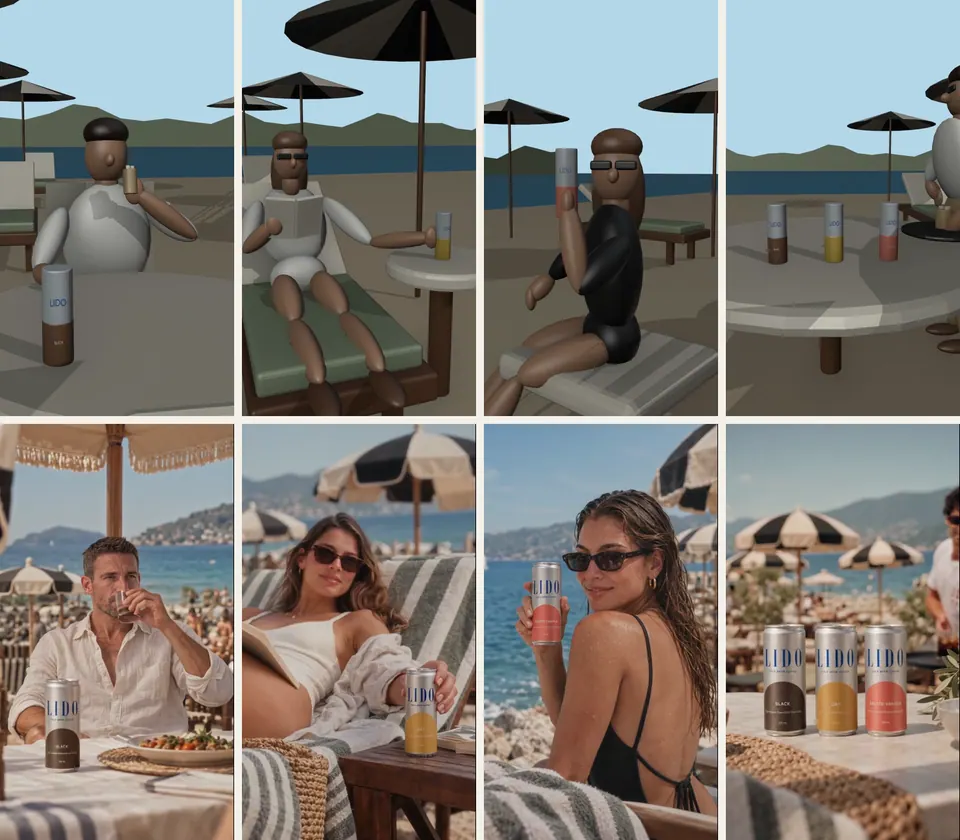
- Made the LIDO film: five shots, all five first takes kept, about $0.82 at listed 480p prices.
- Made the PIP film at 720p after Kling Motion Control rejected the grey-box previs and Wan 3.0 Prime followed it.
- No paid request is possible without --confirm-paid; previews make no uploads or API calls.
The problem
Video models are good at appearance and poor at following a plan. Prompts alone rarely give you the camera move, the timing or the cut you storyboarded, and every retry costs money.
I wanted the motion decided before generation, the look fixed by approved stills, and every paid request previewed, approved and recorded.
From brief to rough cut
-
01
Campaign, scene, shot
The brief, shots and durations live in editable JSON, in edit order.
-
02
Lock references
Approved images are copied into versioned folders with SHA-256 checksums. A changed file stops the run.
Automatic check -
03
Blender previs
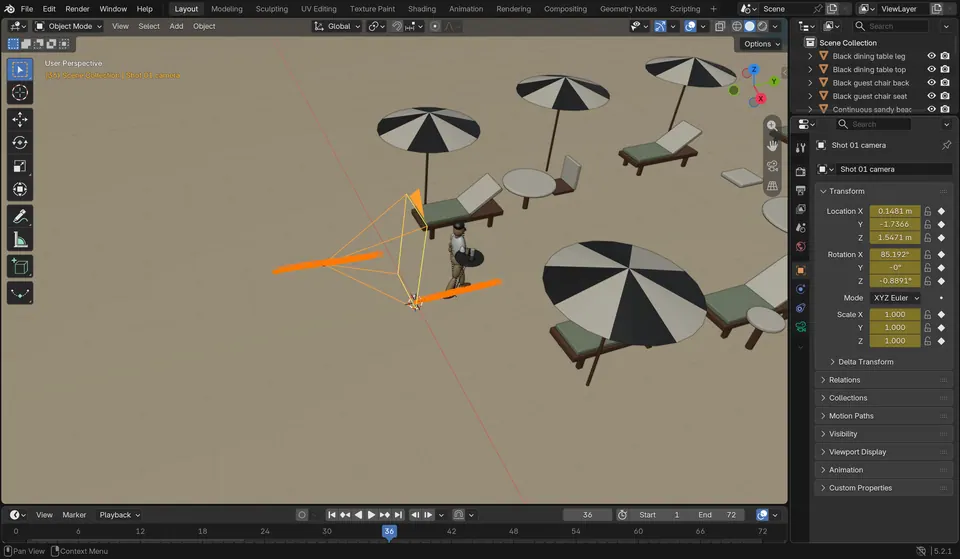
Each shot is blocked in Blender with keyframed cameras and rendered as a motion clip.
-
04
Start frames
An approved still per shot defines the look; the previs defines the motion.
Human approval -
05
Priced preview
Model, endpoint, checksummed inputs, warnings and estimated cost are printed. Nothing is uploaded.
Priced -
06
Paid take
Only --confirm-paid submits. The request ID is saved before polling, and failures are never resubmitted automatically.
Human approval -
07
Review and select
Each take is reviewed; one is selected per shot, with the decision recorded.
Human approval -
08
Rough cut
FFmpeg trims, normalises size and frame rate, and writes a provenance manifest.
Human approval Priced Automatic check
What a preview shows before anything is paid for
Preview output for LIDO shot 05, captured 14 September. The previs clip and each image are checksummed, and the adapter warns about inputs it will not use. Paths, checksums and one warning shortened; prompt omitted.
$ python scripts/generate_video.py projects/lido/…/shot_05/shot.json
{
  "model": "wan-3-prime-reference",
  "endpoint": "alibaba/wan-3.0-prime/reference-to-video",
  "settings": { "resolution": "480p", "aspect_ratio": "9:16", "audio": false },
  "references": {
    "motion":  { "path": "…/renders/previs_0004/previs.mp4", "sha256": "b7dc6e7a1018…" },
    "image_1": { "path": "…/frames_0001/start_9x16.png", "sha256": "d628838adf98…" },
    "image_2": { "path": "assets/style/reference_0003/05-three-flavour-range.png", "sha256": "3b7c24b8497b…" },
    "image_3": { "path": "assets/character/reference_0001/…png", "sha256": "d54eac2a99fe…" }
  },
  "warnings": [
    "wan-3-prime-reference does not use the start frame.",
    "Bible images are recorded for continuity but are not sent as extra image inputs by this adapter. …"
  ],
  "estimated_cost_usd": 0.204
}
One adapter per video model
| Adapter | How the previs is used | fal list price, checked 11 Sep | Live use |
|---|---|---|---|
| Wan 3.0 Prime Reference | Motion reference; images for appearance | $0.068/s at 480p, $0.14/s at 720p | 11 takes: LIDO 5, PIP 6 |
| Kling 3 Pro Motion Control | Movement reference; start frame as the character | $0.168/s | 1 request, rejected at validation: no complete upper body in the grey-box previs |
| Kling 3 Pro | Not used; start and end frames, with timed beats in one request | $0.112/s, audio off | Preview only |
| Seedance 2 Reference | Motion reference; images for appearance | $0.1814/s at 720p | Preview only |
| LTX 2.3 Control | Depth, edge or pose control video | $0.001805 per output megapixel | Preview only |
| Kling 2.1 Standard | Not used; one start image | Not recorded | Preview only (first adapter) |
Each model cites references differently (Video 1 and Image 1 for Wan, @Video1 and @Image1 for Seedance), so every shot holds model-specific prompts. Missing citations are rejected before upload.
The paid-request gate
def generate(shot_path, model_name=None, confirm_paid=False, resume=None, client=None, downloader=download):
    shot_path = Path(shot_path).resolve()
    if not confirm_paid and not resume:
        _, _, preview = prepare(shot_path, model_name)
        print(json.dumps(preview, indent=2))
        return preview
    …
                for role, reference in take["references"].items():
                    path = local_path(root, reference["path"])
                    if digest(path) != reference["sha256"]:
                        raise ValueError("Reference changed after preview; rerun generation")
                    uploaded[role] = client.upload_file(str(path))
                …
                handle = client.submit(adapter.endpoint, arguments=arguments)
                take["request_id"] = handle.request_id
                take["status"] = "submitted"
                save()
    …
        except (Exception, KeyboardInterrupt) as exc:
            # Do not automatically resubmit: a transport failure can follow a billable submission.
            message = str(exc)
            if os.environ.get("FAL_KEY"):
                message = message.replace(os.environ["FAL_KEY"], "[REDACTED]")
            take.update(status="needs_review", error=message or type(exc).__name__)
Preview is the default path. A paid run re-checks every checksum, saves the request ID before waiting, and redacts the key from any error. It never retries a submission by itself, because a failure can follow a billable request.
Inside an adapter
class Wan3PrimeReference(VideoModelAdapter):
    """Blender previs as Video 1 motion reference; appearance from Image 1..10, cited by position."""
    endpoint = "alibaba/wan-3.0-prime/reference-to-video"
    reference_roles = ("motion",)
    accepts_reference_images = True
    RATES = {"480p": 0.068, "720p": 0.14, "1080p": 0.28}

    def arguments(self, prompt, duration, references, settings):
        seconds = whole_seconds(duration, 1, 30, "Wan 3.0")
        unknown = set(settings) - {"resolution", "aspect_ratio", "audio", "enable_prompt_expansion", "seed"}
        if unknown:
            raise ValueError(f"Unsupported Wan 3.0 settings: {sorted(unknown)}")
        video, images = motion_video(references, "Wan 3.0"), images_from(references)
        require_citations(prompt, ["Video 1"] + [f"Image {n}" for n in range(1, len(images) + 1)])
        …
Endpoint contracts stay inside adapters, so a new model is one class. Settings are allowlisted and every reference must be cited in the prompt before anything is uploaded.
Approvals, as recorded
Each paid step is approved on its own, and the scope of the approval is written into the campaign file.
User said yes to the explicitly priced first-shot test. Approval does not include the other four shots or additional paid retries.
User explicitly approved one Shot 2 generation. No approval yet for retries or Shots 3-5.
Select a new take only if it is at least as good as the current 480p selection; otherwise keep the 480p take and report it.
What I'm improving next
These are plans, not features. Each one starts from a problem the LIDO or PIP film ran into, and follows the later phases of the project roadmap.
-
01
Check the previs before it costs anything
Seen in productionA product pushed at the lens broke the first LIDO previs and went wrong twice on PIP, where trimming the mistake left a visible snap.
The changeThe LIDO project already checks its previs for blank or blocked frames and products leaving the frame. Those checks move into the core pipeline, with new ones for pushes at the lens, objects crossing a face and actions that end off screen.
-
02
Choose references from the locked library
Seen in productionLIDO's packaging references were poster images with headlines, while clean studio pack shots sat unused in the product library.
The changeSuggest references from locked assets by what each shot needs, and flag any that carry text the model could copy onto the product.
-
03
Check the label on every take
Seen in productionAt 480p a can is about 100 pixels wide, and the small print under each flavour name broke up.
The changeCompare the label area of each take with the studio pack shot before selection. Keep 480p for motion tests and render label shots at 720p or 1080p.
-
04
Two takes per shot, compared side by side
Seen in productionWan's timing drifted by up to a second, and it improvised when a move was fast or unclear.
The changeRun two takes per shot by default and review them against the previs on one screen, with the cost of each take beside it.
-
05
Match each shot to the right model
Seen in productionWan followed the previs loosely. The LTX-2.3 and Seedance 2.0 adapters are wired up and priced but have not been run.
The changeTest LTX-2.3 for strict frame-by-frame control and Seedance 2.0 for livelier performances on the same shots, then record which model suits which kind of shot.
-
06
Plan transitions with the shots
Seen in productionOn PIP, swapping products on identical framing looked like a glitch until the product itself became the transition.
The changeRecord each transition and its matching frames in the shot plan, so both sides of a cut are blocked together in Blender.
Sources: the LIDO and PIP production notes (September 2026) and the project roadmap, whose later phases add reference selection from locked assets, product-fidelity checks, model routing by shot and side-by-side review.
How it's built and tested
- Tests
- 22 passing, with a fake fal client and real FFmpeg clips: dry-run safety, reference locks, versioning, recovery, selection, and the order and duration of the cut. No test makes a paid request.
- Stack
- Python 3.9+, JSON records, argparse, Blender (bundled Python) and FFmpeg. fal-client is the only direct dependency.
- Safety
- FAL_KEY is read only from the environment and never stored. Advisory file locks serialise updates to a shot.
- Built
- September 2026, for the LIDO and PIP films.